

Home › Guides › Referee video analysis
Video analysisVideo analysis for basketball referees
Watching your game back is the best way to improve. You just need to find the right plays in 90 minutes of footage. REF CLIPS, the video analysis app from the Referee Tracker family, turns your game into clips ready to review or send to your referee coach.
Why review your games on video
- Check your calls with a cool head: what you called, and what you should have called.
- Work on your positioning and your rotations with your partner.
- Prepare a talk with your referee coach or assessor, with clips to back it up.
- Keep a record of your progress from one game to the next.
How REF CLIPS works
- You open your game video, from your computer or from a link sent by the club (Drive, Dropbox, WeTransfer).
- You type the call code on the keyboard while it plays: "travelling", "unsportsmanlike"… Press Enter and the moment is tagged with the right quarter.
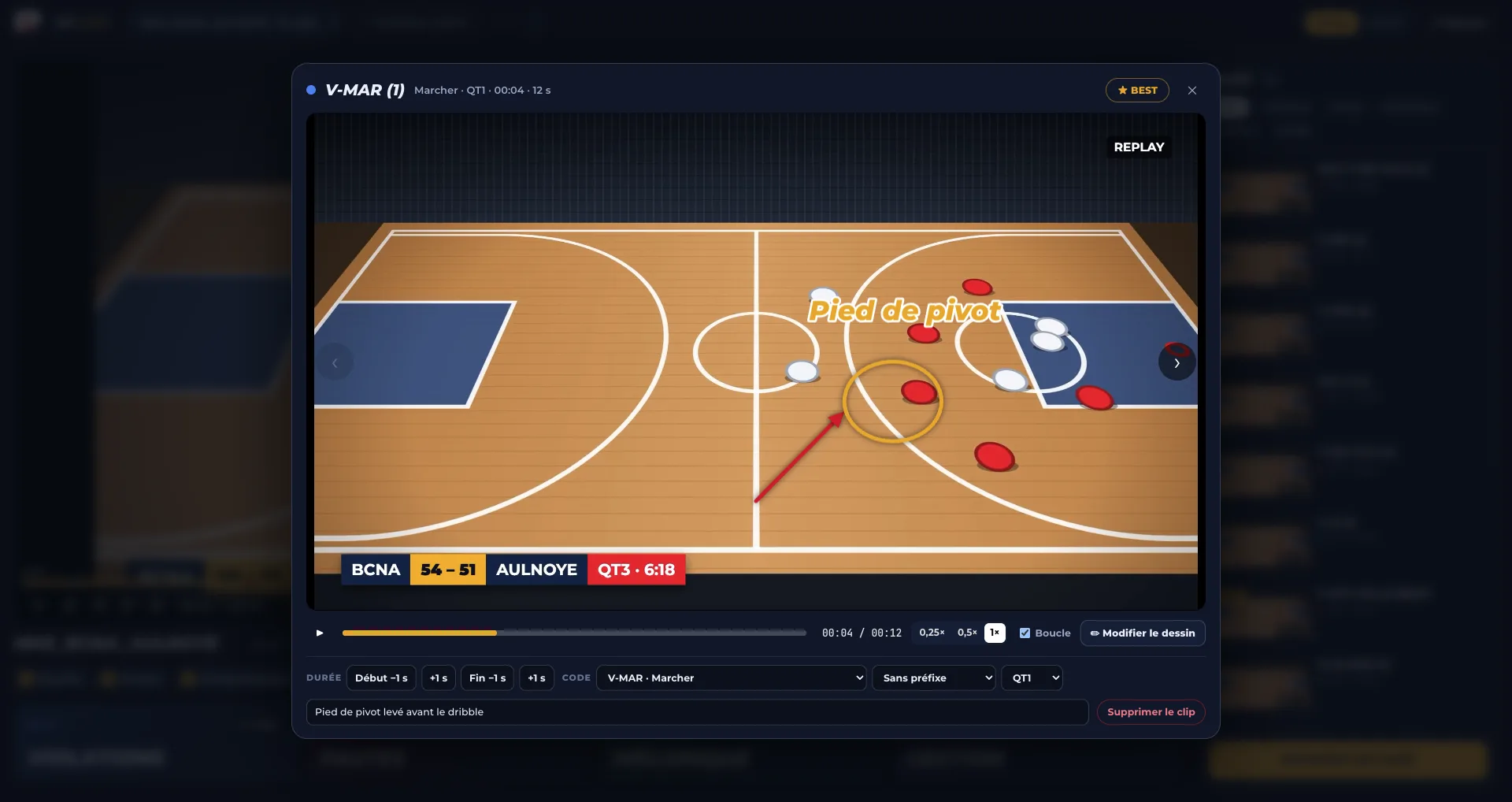
- You draw on the picture: an arrow, a circle round your position, and the video holds on your drawing for a few seconds.
- REF CLIPS cuts each play into a clip, up to 4K, and creates a clear PDF report of your game.
Built for refereeing
| Need | REF CLIPS |
|---|---|
| Tag fast without leaving the video | Keyboard tagging, refereeing call codes |
| Show a position | Drawing on the picture, freeze on the drawing |
| Share with a referee coach | Precise clips and a PDF report |
| Get the club's video | Import from a link |
| Find your games | Your Referee Tracker account: your games show up straight away |
On Mac and Windows
REF CLIPS installs on your computer, Mac or Windows, and opens with your Referee Tracker account: no new account to create.
Discover REF CLIPS and download it
Filming your game for analysis
- Camera up high, level with the half-court line, to see the whole court and every official.
- A wide, steady shot: a tripod or a seat in the stands avoids shaky footage.
- The whole game, including time-outs: what happens between officials matters too.
- The original file rather than a compressed copy: positioning details stay visible.
With good footage, analysis goes faster: every play you tag in REF CLIPS becomes a sharp clip your referee coach can comment on precisely.
Frequently asked questions
How do I review a refereed game on video?
Watch your game and tag each call as it happens, then go back over the plays one by one. REF CLIPS automates this: a keyboard code tags the play, the app cuts the clip and prepares a PDF report.
What video analysis software is there for basketball referees?
REF CLIPS is a video analysis app built for basketball referees, on Mac and Windows: keyboard tagging, precise clips, drawing on the picture and a PDF report.
Can I use the video a club sends me?
Yes: paste the Drive, Dropbox or WeTransfer link and REF CLIPS fetches the video.
Do I need a separate account for REF CLIPS?
No. REF CLIPS opens with your Referee Tracker account, and your games show up straight away.
Read next
Your next game can be your best video session.
REF CLIPS, video analysis for basketball referees, on Mac and Windows.
Discover REF CLIPS